Does MAZDA Have Apple CarPlay®?

Mazda Apple CarPlay
 

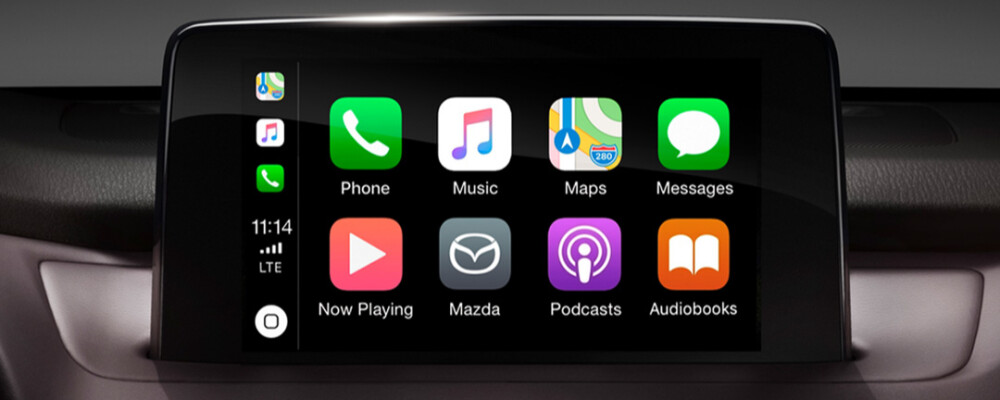
Many car shoppers ask about Apple CarPlay® as more automakers are incorporating this feature into their vehicles. Apple CarPlay® is available on select Mazda vehicles, and it seamlessly integrates your iPhone with your vehicle’s Mazda Connect™ display. Learn more about Mazda Apple CarPlay® with the team at Grappone Mazda today, and find out how it can help you enhance your daily drives throughout the Concord area.

What Is Apple CarPlay®?

As you shop for your next Mazda vehicle, you may wonder if it comes with Apple CarPlay® and if it meets your tech needs. Mazda Apple CarPlay® is a top feature among many drivers around Manchester, and it’s easy to see why. With your Mazda infotainment system, all your favorite apps, including Apple CarPlay®, are conveniently accessible. This integration allows you to:

  • Make phone calls
  • Read and dictate text messages
  • Stream music, podcasts
  • Operate Apple Maps and navigation
  • Access IOS apps
  • Communicate with Siri
  • And more!

To find out which models feature wireless or integrated Apple CarPlay®, please message our sales team or call 603-697-7417.

How To Set Up Apple CarPlay® In A MAZDA

Getting started with Mazda Apple CarPlay™ is straightforward. Here’s what you need to ensure a smooth setup:

  • iPhone Compatibility: Ensure you have an iPhone 5 or newer model.
  • Update iOS: For optimal performance, make sure your iPhone is running the latest iOS version.
  • Connection Cable: Use an Apple Lightning® to USB cable to connect your iPhone.
  • Enable Siri®: Siri must be activated to use Apple CarPlay®.

Once you have the essentials above in place, follow the steps below and get ready to enjoy Apple CarPlay® on your Tilton drives:

  1. Connect Your iPhone: Plug the Apple Lightning to USB cable into your iPhone and the USB port in the center stack or inside the center armrest (depending on your vehicle model).
  2. Detect and Enable: Mazda Connect™ will recognize your iPhone. If it’s your first time using Apple CarPlay®, follow the on-screen prompts to activate it.
  3. Allow Access: On your iPhone, select “Allow” on the pop-up notification to enable your vehicle to access Apple CarPlay® content without needing to unlock your iPhone.
  4. Wireless Option: For vehicles with Wireless CarPlay®, a notification will appear on your iPhone asking, “Use Wireless Apple CarPlay® with ‘Mazda’?” Choose “Enable Wireless CarPlay®” for wireless connectivity or “Use USB Only” if you prefer to connect via USB only.

Once you connect a compatible iPhone to the vehicle’s USB port, Apple CarPlay® will launch automatically. Additionally, you can easily access and start using Apple CarPlay® through several intuitive options available on the Mazda Connect™ home screen.

Experience MAZDA Apple CarPlay® at Grappone Mazda!

If you have any more questions about the features you can find inside and out of a new Mazda, the team is ready to help. Visit us in Concord, or reach out online with any questions you may have about Mazda Apple CarPlay® or other brand features like Skyactiv® Technology.

More from Grappone Mazda

  • What Happens If You Skip Routine Maintenance on Your Mazda?

    What Happens If You Skip Routine Maintenance on Your Mazda? Routine maintenance is one of the most important parts of vehicle ownership, but it is also something many drivers postpone from time to time. Busy schedules, changing priorities, or a vehicle that still “seems fine” can make it easy to delay service visits. However, skipping…

  • What Hot Weather Does to Your Mazda Vehicle Battery

    What Hot Weather Does to Your Mazda Vehicle Battery Many drivers associate battery problems with winter, but hot summer temperatures can be just as hard on your vehicle’s battery. In some cases, extreme heat may actually shorten battery life faster than cold weather. During summer in New Hampshire, higher temperatures, road trips, traffic, and increased…

  • What Is a Good First Mazda Vehicle for New Drivers?

    What Is a Good First Mazda Vehicle for New Drivers? Choosing a first vehicle is a big decision for many drivers and families. Whether someone is getting their first license, heading off to college, or simply purchasing their first vehicle independently, there are several factors that usually matter most: safety, reliability, ease of driving, practicality,…

Saved Vehicles

You don't have any saved vehicles!

Look for this Save icon

Once you've saved some vehicles, you can view them here at any time.

Get Directions

134 Manchester St, Concord, NH, 03301
Grappone Mazda 43.18846601414383, -71.50378118477592.

